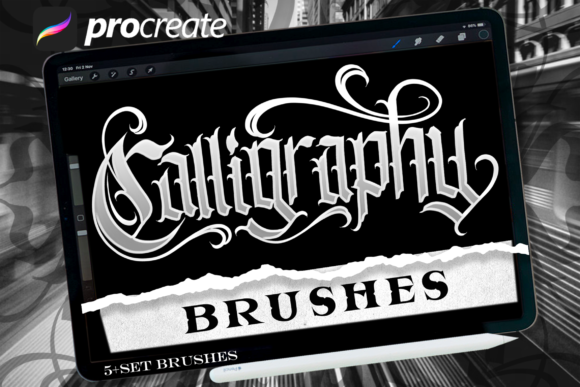
Calligraphy Brush 1: Bridging Analog Artistry with Digital Precision
We have been working with lettering for a long time. Our roots are deeply planted in the tactile world of ink, paper, and traditional tools. However, recently we’ve noticed a significant shift in the creative landscape: a growing demand for specific materials that allow artists to work with lettering digitally without losing the soul of the analog craft. As a lettering artist who focuses almost exclusively on analog artwork, I understand the frustration of trying to replicate the organic feel of a nib on a screen. It often feels stiff, artificial, or overly polished.
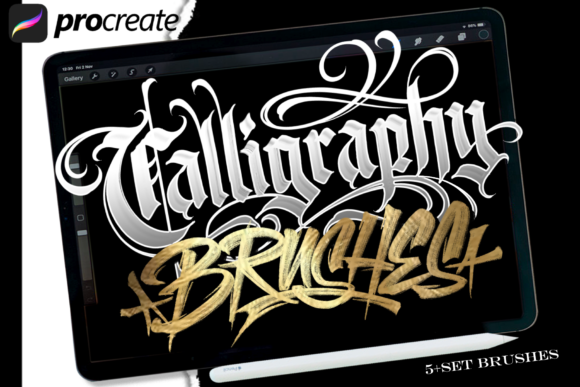
To address this gap, we spent hours dedicated to creating handmade resources in an analog style, specifically designed to work seamlessly in Procreate using the iPad Pro and Apple Pencil. We didn’t just guess; we studied what works and what does not to create our own extensive brush sets. The result is Calligraphy Brush 1, a toolset designed to give you the perfect possibility of creation. It allows you to maintain the authenticity of hand-lettering while leveraging the efficiency of digital workflows.
The Philosophy Behind the Design
In Calligraphy Brush 1, we aimed to make it easier for you to be creative by offering digital works with analog touches that look very real. This isn't about replacing the traditional artist; it's about empowering them. Whether you are making lettering designs, posters, flyers, or designing anything without any limitations as you wish, these brushes provide the flexibility needed for modern design.
The core philosophy here is "digital ease, analog heart." Traditional digital brushes often lack the pressure sensitivity nuances or the texture variations found in real calligraphy pens. By studying the behavior of wet ink on absorbent paper, we engineered brushes that mimic those interactions. When you press harder, the stroke widens and the ink bleeds slightly more realistically. When you lift off, the taper is natural, not geometric. This attention to detail is what separates a generic font from true lettering art.
What’s Inside the Set?
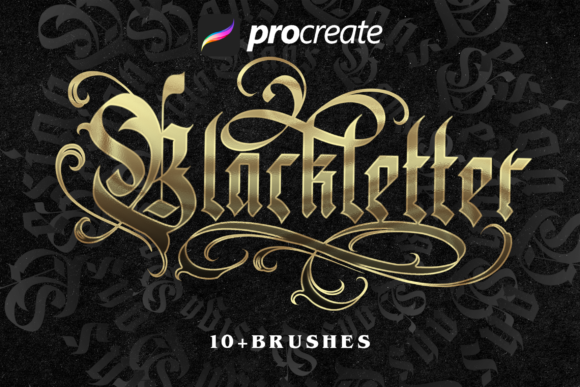
Calligraphy Brush 1 includes 5 amazing blackletter brushes. Blackletter, also known as Gothic script, is one of the most complex and visually striking styles of lettering. It requires precision, rhythm, and a deep understanding of form. Getting this right digitally is notoriously difficult because the angles are sharp, and the spacing must be exact.
- Versatility: Each brush is tuned to capture different aspects of blackletter, from broad foundational strokes to delicate hairlines.
- Realism: The brushes are textured to avoid the "plastic" look common in many digital typefaces.
- Customizability: They respond well to Procreate’s native pressure and tilt features, allowing for dynamic expression.
This variety ensures that whether you are a beginner looking to learn the structure of blackletter or a professional seeking speed in client projects, you have the right tool for the job.
Practical Applications Across Industries
Why should professionals, educators, and hobbyists care about high-quality digital calligraphy brushes? The answer lies in branding, engagement, and efficiency. Here is how Calligraphy Brush 1 can be applied in real-world scenarios:
Branding and Identity Design
For entrepreneurs and business owners, first impressions matter. A logo or brand mark that looks hand-crafted conveys trust, heritage, and personal touch. Using Calligraphy Brush 1, designers can sketch unique logos that stand out against the sea of vector-based, sterile corporate identities. Imagine a boutique coffee shop or a artisanal bakery needing a menu or signboard. Hand-lettered elements add warmth and character that stock fonts simply cannot match.
Educational Materials and Content Creation
Educators and bloggers can use these brushes to create engaging visual aids. Instead of relying on standard text boxes, teachers can illustrate concepts with custom diagrams and highlighted key terms. Bloggers and publishers can enhance their articles with pull quotes or headers that feel curated and artistic. This increases reader retention and makes content more shareable on social media platforms where visual appeal drives clicks.
Event Marketing and Print Design
Flyers, posters, and event invitations benefit immensely from the aesthetic of blackletter and calligraphy. These styles evoke tradition, elegance, and importance. With Calligraphy Brush 1, marketers can quickly prototype designs for weddings, galas, or cultural events. The ability to iterate rapidly in Procreate means you can test different layouts and color combinations without wasting physical materials, significantly speeding up the production cycle.
Benefits for the Modern Creator
Adopting specialized tools like Calligraphy Brush 1 offers several tangible benefits beyond just aesthetics:
- Efficiency: Sketching by hand, scanning, and cleaning up takes time. With these brushes, you go straight to the final output. You can correct mistakes instantly without starting over.
- Consistency: Once you master the flow of these brushes, your lettering becomes consistent across all projects. This is crucial for maintaining brand integrity.
- Enhanced User Experience: For app developers or UI/UX designers, incorporating hand-drawn elements can soften the user interface, making digital products feel more human and approachable.
- Creative Freedom: There are no limitations as you wish. You can mix styles, experiment with colors, and layer effects freely. The digital canvas removes the fear of ruining expensive paper or ink.
Choosing the Right Tools for Your Workflow
When evaluating digital assets, it is important to consider usability and compatibility. Calligraphy Brush 1 is designed specifically for the Procreate ecosystem, which is the industry standard for iPad illustration. If you are already invested in the Apple Pencil workflow, integrating these brushes is seamless.
However, potential users should keep a few practical considerations in mind. First, mastery of digital calligraphy still requires practice. While the brushes do the heavy lifting regarding texture, your hand movement determines the quality of the line. We recommend spending time practicing basic strokes before tackling full compositions. Second, ensure your iPad Pro has sufficient storage and processing power to handle high-resolution brush libraries smoothly.
Final Thoughts on Elevating Your Craft
The intersection of analog tradition and digital innovation is where some of the most exciting contemporary art is being created. Calligraphy Brush 1 represents more than just a set of files; it is a bridge between two worlds. It respects the history of lettering while embracing the possibilities of modern technology.
Whether you are a freelancer looking to expand your service offerings, an educator wanting to create more engaging materials, or a hobbyist eager to explore new creative horizons, this toolset provides the foundation for excellence. By focusing on realistic textures and responsive behavior, we have stripped away the barriers between intention and execution. You can now focus on what matters most: your creativity. Start exploring the depths of blackletter and discover how Calligraphy Brush 1 can transform your digital workspace into a studio of unlimited potential.